It started with a simple mistake. A proposal was sent to a potential client in a Word document. Within minutes, the formatting broke, fonts changed, and alignment shifted. What looked perfect on one screen appeared messy on another.
This is a common issue many professionals face without realizing the impact. File format choices may seem minor, but they can shape first impressions, credibility, and even business outcomes.
When comparing PDFs vs. Word documents, the difference goes beyond convenience. It directly affects how your content is viewed, shared, and protected.
In today’s digital environment, sending PDFs instead of editable documents is not just a preference. It is a strategic decision that enhances professionalism, security, and consistency.
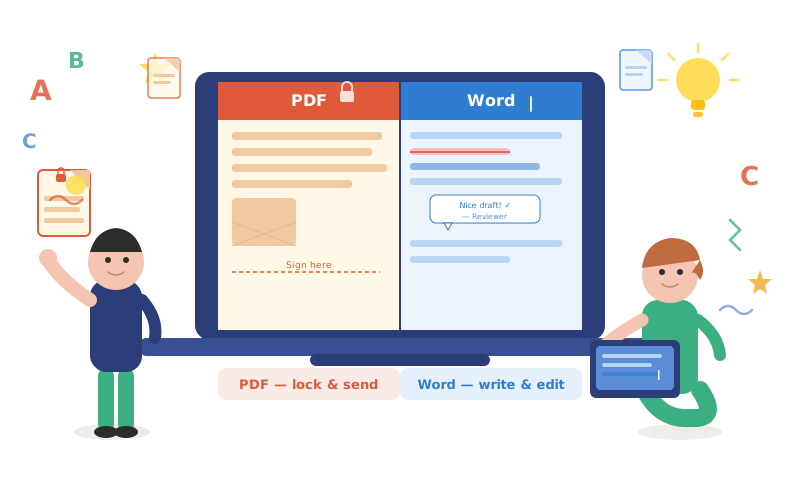
The Real Problem: When Documents Don’t Look The Same Everywhere
Imagine sending a resume, contract, or business proposal. You’ve spent hours perfecting it. However, the recipient opens it and sees broken formatting.
Margins shift. Fonts change. Images move out of place.
This happens because Word documents depend on system compatibility. Different devices, software versions, and fonts can alter how the file appears.
This inconsistency creates confusion and reduces the impact of your work. It may even affect how seriously your document is taken. This is where the importance of choosing a PDF instead of a Word document becomes clear.
What Makes PDFs More Reliable Than Word Documents?
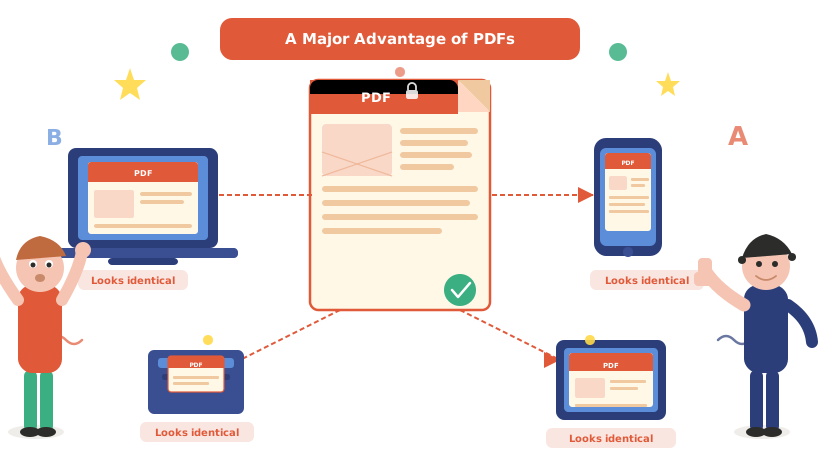
PDFs are designed to preserve formatting across all devices. Whether opened on a laptop, phone, or tablet, the file looks exactly the same.
This consistency ensures that your message is delivered as intended, without unexpected changes.
Fixed Layout & Design
PDFs lock the layout, ensuring every element stays in place. Text, images, and formatting remain unchanged regardless of the device.
Universal Compatibility
Unlike Word files, PDFs do not depend on specific software versions. They can be opened easily using various applications and browsers.
Professional Presentation
A well-formatted PDF reflects attention to detail. It signals professionalism and builds trust with the recipient.
First Impressions Matter More Than You Think
In business communication, first impressions are often formed within seconds. A poorly formatted document can unintentionally communicate carelessness.
Consider a scenario where two proposals are sent. One arrives as a clean, polished PDF. The other appears as a distorted Word file.
Even if the content is identical, perception changes everything. Therefore, choosing the right format helps you present your work with confidence and clarity.
Security: A Major Advantage of PDFs
Word documents are easily editable. While this flexibility is useful during creation, it becomes a risk when sharing finalised files.
Recipients can modify content, either intentionally or accidentally. This can lead to miscommunication or misuse of information.
PDFs, on the other hand, offer better control over document security.
- Restricted Editing
PDFs can be locked to prevent unauthorised changes. This ensures that the original content remains intact.
- Password Protection
Sensitive documents can be secured with passwords, adding an extra layer of protection.
- Digital Signatures
PDFs support secure digital signatures, making them ideal for contracts and official agreements.
These features make PDFs a safer choice when sharing important information.
Why Businesses Prefer PDFs for Communication?
Modern businesses rely heavily on digital communication. Consistency and reliability are essential in maintaining professional relationships.
So, when evaluating a PDF vs a Word document, organisations often choose PDFs for external communication.
Standardized Communication
PDFs create a uniform experience for all recipients. This eliminates confusion caused by formatting issues.
Better Branding
Companies often use specific fonts, colours, and layouts. PDFs ensure that branding elements remain consistent across all documents.
Easy Sharing across Platforms
PDFs can be shared via email, messaging apps, or cloud platforms without compatibility concerns.
The Hidden Risk of Sending Word Documents
Many professionals continue to send Word files out of habit. However, this approach comes with hidden risks.
Accidental Edits
Recipients may unintentionally edit content while reviewing the document. This can lead to confusion or misinterpretation.
Version Conflicts
Multiple versions of Word documents often circulate during collaboration. Tracking changes becomes difficult over time.
Formatting Breakdowns
As mentioned earlier, formatting issues can undermine the effectiveness of your message. These challenges highlight why switching to PDFs is a smarter choice.
When Should You Still Use Word Documents?
Despite the advantages of PDFs, Word documents still have their place.
Collaborative Work
Word files are ideal for drafting, editing, and collaborative projects. They allow multiple users to make changes easily.
Content Development
During the creation phase, flexibility is essential. Word documents provide the freedom to modify content quickly.
Internal Communication
For internal use, where formatting consistency is less critical, Word documents can be practical. However, once the document is finalised, converting it to a PDF is recommended.
The Simple Habit That Changes Everything
Switching from Word to PDF before sending a document may seem like a small step. However, it creates a significant impact. This habit ensures that your work is presented exactly as intended. It also reduces the chances of errors and miscommunication.
Professionals who consistently use PDFs often appear more organized, detail-oriented, and reliable.
A Real-World Scenario: The Difference in Outcome
Consider two job applicants applying for the same position. Both have similar qualifications and experience. One sends a resume in Word format. The formatting shifts slightly when opened.
The other sends a clean, well-structured PDF.
The second applicant immediately appears more professional. This subtle difference can influence decision-making. Moreover, such an example highlights how format choice can shape outcomes in real-world situations.
How to Convert Word Documents to PDF Easily?
Making the switch to PDFs is simple and does not require advanced technical skills.
- Using Built-in Features: Most word processors include an option to save or export documents as PDFs.
- Online Tools: Various online platforms allow quick and easy conversion without installing software.
- Print to PDF Option: Many systems offer a “Print to PDF” feature, which converts documents during the printing process.
These methods make it easy to adopt PDFs as a standard practice.
The Role of PDFs in Modern Digital Communication
As digital communication evolves, the need for reliable file formats becomes more important.
PDFs have become the standard for sharing professional documents across industries. From contracts to presentations, they ensure consistency and security.
When comparing a PDF vs. a Word document, the long-term benefits of PDFs clearly stand out.
Common Misconceptions about PDFs
Some professionals hesitate to use PDFs due to common misconceptions.
“PDFs Are Hard to Edit”
While PDFs are not meant for editing, there are tools available for making changes when necessary.
“Word Documents Are More Flexible”
Flexibility is useful during creation, but not always ideal for sharing finalised content.
“PDFs Are Not Necessary for Small Tasks”
Even simple documents benefit from consistent formatting and professional presentation. Therefore, understanding these points helps in making informed decisions.
Building A Professional Habit
Developing the habit of sending PDFs reflects a commitment to quality and professionalism. It shows that attention has been given to how the document will be received and understood.
Over time, this small practice builds trust and credibility in professional relationships.
End Note
Choosing between a PDF vs Word document is more than a technical decision. It is about how your work is perceived, protected, and delivered.
PDFs offer consistency, security, and professionalism that Word documents often cannot guarantee. They eliminate formatting issues, reduce risks, and enhance presentation.
In a world where details matter, this simple choice can create a lasting impact. By consistently sending PDFs, professionals ensure their work speaks clearly, confidently, and exactly as intended.
If you want to read more such interesting blogs on PDF tools, regularly follow Dupli Scanner.